Works with TherapyNotes
AI progress notes for TherapyNotes
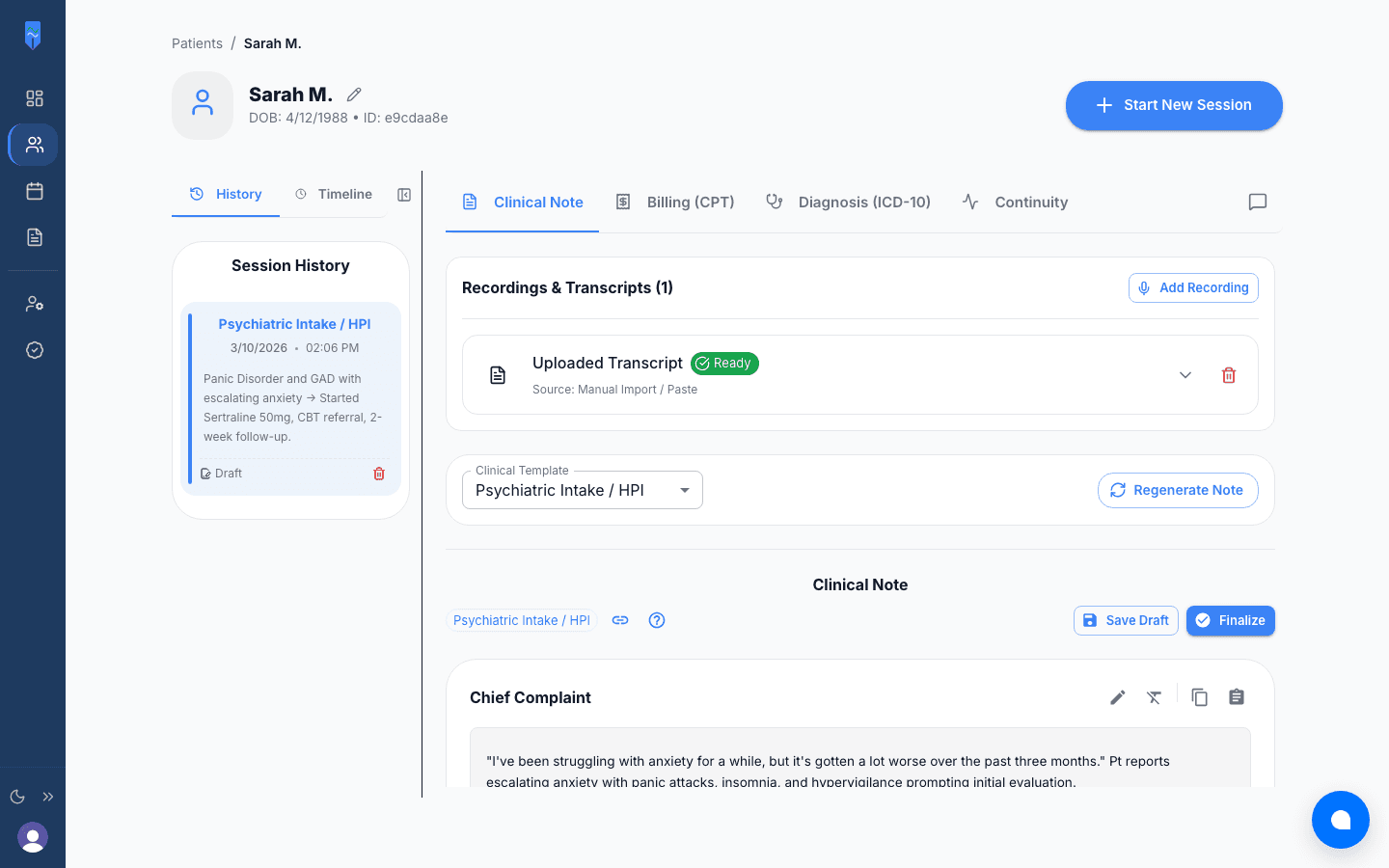
Keep TherapyNotes as your EHR. MH Scribe drafts each part of the progress note from the session. You paste the sections into the matching TherapyNotes fields and sign.
5 free AI notes every month • No credit card • Nothing to install in TherapyNotes
HOW IT WORKS
From session to signed TherapyNotes note
Record or upload the session
Record in the room on your phone or computer, or capture a telehealth call from its tab in desktop Chrome, on any platform. Or upload the audio afterward.
Pick a template and review
Choose SOAP, DAP, BIRP, GIRP, intake, or your own template when you generate the note. MH Scribe follows your instructions, and you edit the draft in place.
Paste into TherapyNotes
Open the note from your To-Do list or the appointment. Paste each section into its field, complete the pick-lists, and sign as usual.
Where each section goes in TherapyNotes
The standard TherapyNotes Progress Note is a structured form with a field for each part of the note, so paste section by section. Every MH Scribe section has its own copy button.
| MH Scribe section | Paste into (TherapyNotes) |
|---|---|
| Subjective / client report | Symptom Description and Subjective Report |
| Objective / clinical observations | Objective Content. Then set the Current Mental Status pick-lists to match. |
| Risk assessment | Risk Assessment (a required field): complete it using the risk details in the note. |
| Interventions | Interventions Used: tick the checkboxes that match the interventions the note lists. |
| Progress toward goals | Treatment Plan Progress |
| Assessment | Additional Notes / Assessment |
| Plan | Plan, Recommendation, and Prescribed Frequency of Treatment (required). |
| Diagnosis suggestions | Diagnosis (required): select the ICD-10 codes you confirm. |
• Build an MH Scribe template whose sections mirror the TherapyNotes fields above, and every paste has an obvious home.
• If your practice enabled TherapyNotes’ SOAP, DAP, or BIRP templates, paste each MH Scribe section into the field with the same name.
• If you build custom templates in TherapyNotes, Long Response elements hold up to 6,000 characters. A normal progress note section fits easily.
• Copy as plain text if formatting doesn’t carry over. It pastes cleanly into any field.
Why clinicians use MH Scribe with TherapyNotes
Record wherever you see patients
In the room, or on any telehealth platform. You can also upload audio after the session or paste a transcript.
Pick the template after the session
Choose SOAP, DAP, BIRP, GIRP, intake, or your own template when you generate the note. Want the same session as a DAP instead? Switch templates and regenerate.
Your templates, your instructions
Write your own sections and rules. MH Scribe follows them, so the note comes out in the shape your EHR expects.
Codes to check, not guess
CPT suggestions with the reasoning from your note, and ICD-10 suggestions with the DSM-5 criteria they matched. You decide what gets billed.
Each session builds on the last
Continuity AI compares today with earlier sessions. The clinical timeline lays out medications, orders, and visits.
Letters from the same notes
Referrals, treatment summaries, and prior authorizations drafted from your notes, on your letterhead.
BAA in the Terms
Coverage starts at signup. Your data is never used to train AI models.
5 free notes every month
Every feature, no credit card. Pay only if you want unlimited notes.
As of October 2026, TherapyNotes’ own drafting tool, TherapyFuel, is a paid per-clinician add-on. Per the TherapyNotes help center, its Scribe works from TherapyNotes Telehealth or in-person sessions and doesn’t work with third-party telehealth platforms or uploaded transcripts. MH Scribe records on any telehealth platform or in person, accepts uploaded audio or a pasted transcript, and starts free.
Why there's no integration to set up
Works on day one
Nothing for your EHR vendor or IT to approve. Sign up, write a note, and paste it into your next progress note.
Same steps in every EHR
Copy and paste works the same everywhere. If you switch EHRs later, the way you write notes stays put.
You review first
Nothing goes into the clinical record on its own. You read and edit the note, paste it, and sign in your EHR as usual.
Not another EHR add-on
MH Scribe is billed separately from your EHR. Start with 5 free notes a month and upgrade only if it earns its place.
Frequently asked questions
No integration is needed. MH Scribe writes the note, and you paste each section into the matching field of your TherapyNotes progress note. Nothing to install or connect, and TherapyNotes stays your official record.
MH Scribe works on any telehealth platform or in person, and from uploaded audio or a pasted transcript. You pick any template when you generate the note, regenerate it in another format if you need to, and can write your own templates. It also suggests CPT and ICD-10 codes, carries context from one session to the next, and drafts letters from your notes. As of October 2026, TherapyFuel is a paid TherapyNotes add-on that works from TherapyNotes Telehealth or in-person sessions and doesn’t support third-party telehealth platforms.
Yes. The note includes the risk details and plan you need for the required Risk Assessment and Plan, Recommendation, and Frequency fields, and Diagnosis AI suggests ICD-10 codes for the required Diagnosis section. You confirm each code before selecting it in TherapyNotes.
Yes. A normal progress note section is a few paragraphs. If you build custom templates in TherapyNotes, their Long Response elements hold up to 6,000 characters.
MH Scribe is designed for HIPAA. It is hosted on AWS (SOC 2 Type II infrastructure) with encryption at rest and in transit, and our Business Associate Agreement is built into our Terms, so coverage starts at signup. Pasting a note into your EHR is a normal part of documentation.
Yes. Every account gets 5 free AI notes a month with every feature and no credit card. Paste a few into TherapyNotes and decide from there.